Most buyers start the same way. You scroll the listing sites at night, tap the heart on anything promising, go see a couple of them, take pictures, scribble notes on the backs of the listing printouts, and tell yourself you will sort it out later. Then later arrives. You have nineteen hearted houses, and now you cannot remember which one had the water stain under the kitchen window.
Zillow's great, but their Favorites List is not cutting it as an organizer.
Zillow was built for agents
Zillow earns its money from real estate agents. Agents pay to appear next to listings, and they pay for the buyers who tap Contact Agent. So Zillow built the site around that: show the inventory, make the houses look good, put a contact button on every page.
It meets some real needs. Sellers need somewhere to show a house, agents need somewhere to be found, and you need somewhere to see what is on the market. Zillow does all three well, which is why you keep going back.
But nobody at Zillow was designing for you in week three, looking at your nineteen favorites and trying to recall whether the house on Calle Luna had the good light or backed onto the arterial road. Zillow never promised to solve that. You need a second tool, and it should be one that works for you.
Credit where it is due: what Saved Homes really does
Zillow's Saved Homes has some useful features:
- The heart icon saves any Zillow listing, and saved homes collect under Saved Homes, with a map alongside the list.
- Homes to Compare lines up to five saved properties side by side in a single chart.
- You can share a comparison chart by text, email or link, including with your agent or whoever is house hunting with you.
- Zillow tells you when a saved home drops in price, goes off market, or has an open house coming up.
Where it falls short
It only holds what Zillow lists
You cannot save a link to the builder's website, a listing's dedicated website, a brokerage's page, or the HOA's website. So you end up with your house-hunting information all over the place.
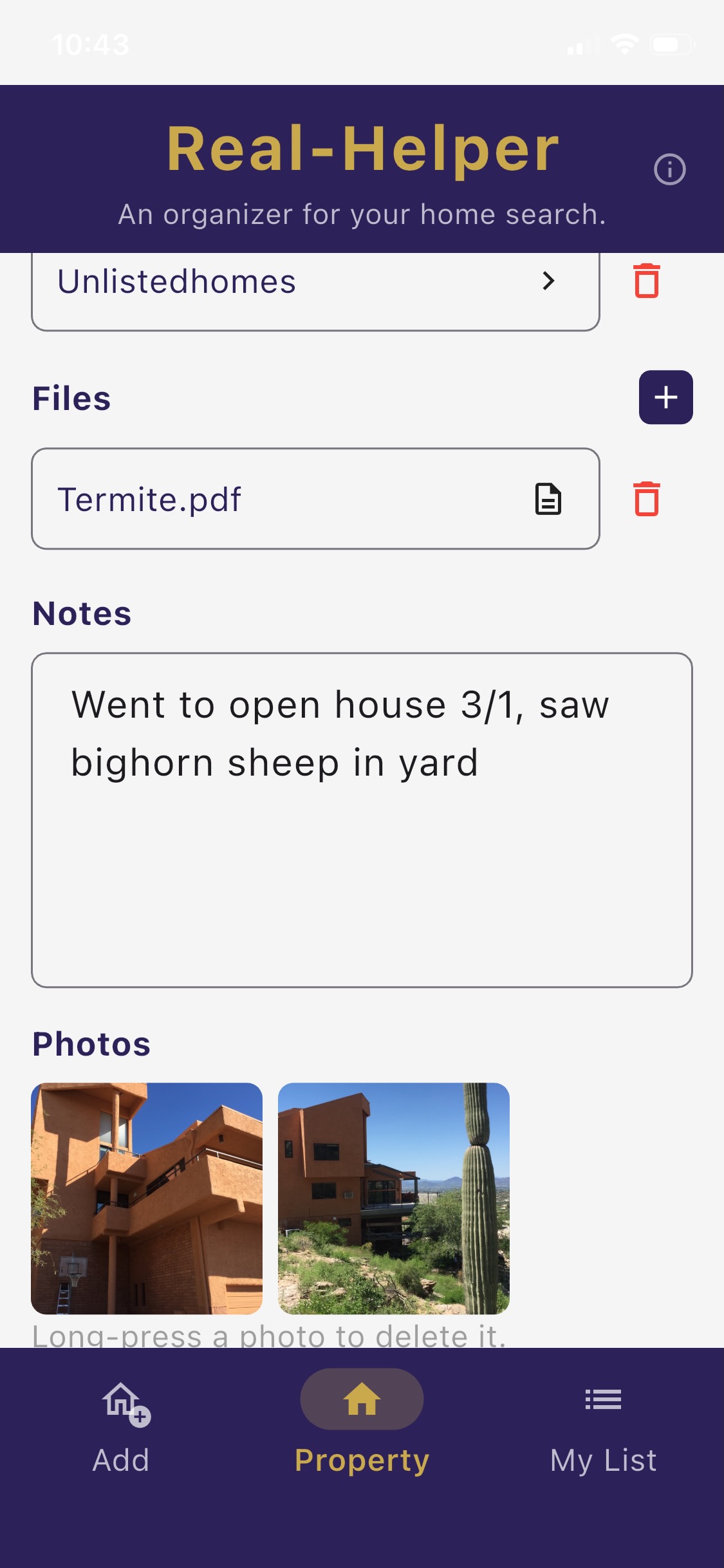
You cannot add your own photos
The seller's agent hired a photographer and picked the best twelve shots, months ago. You want the cracked driveway, the date sticker on the furnace, the view out of the back bedroom, and the closet you had to turn sideways in.
Five at a time, and only their columns
The compare chart holds what Zillow already knows: beds, baths, price, square footage. There is no column for your drive to work, the school boundary, the HOA rules, or the neighborhood ambience on a weekday evening.
Nowhere to write anything down
A favorited home on Zillow has no notes field - or if it does, it's sure not easy to find. You can email your impressions to whoever is house hunting with you, but what if you want to find your notes in a couple of weeks? Dig through your sent mail folder?
Real-Helper was built for you
Real-Helper shows your home search, from YOUR perspective. Everything you put into Real-Helper belongs to you. Your property list lives on your device. We do not use your data for advertising, profiling, or sale to third parties, and you can read that in plain language in our Privacy Policy.
Zillow never sees any of it. Not your notes, not your photos, not the links you collected, not the houses you crossed off or why you crossed them off. Nobody is buying your name as a lead.
If you want an agent involved, you invite one, when you are ready. If your agent chooses to join you in our little ecosystem by using our agent app, Real-Helper: Agent, AND if you have a buyer broker agreement with them, they will see your property list - and only the list, not your private notes and photos! Real-Helper doesn't get money from agents to sell your home search info to them. That is the difference in one sentence: Zillow was built to showcase listings and put agents in front of buyers. Real-Helper was built to help you pick a house.
Try it out on five houses
Free for up to five properties, with notes, photos, maps, drive times and Power Rankings included. Start without signing in.
The $9.99/month Premium plan lifts the five-property limit, and gives you access to your listings' county property data at the click of a button.
Download Free on the App StoreSide by side
What each one is actually built to do.
| Zillow Saved Homes | Real-Helper | |
|---|---|---|
| Find homes for sale | Excellent, that is the point | No listing feed of its own |
| Save a home from any website | Zillow listings only | Yes, browse to any page and save it |
| Save a home with no listing at all | No | Yes, type the address or stand outside and tap Use My Location |
| Your own photos | No | Yes, as many as you like, per property |
| Notes that stay with the house | No, you can email your thoughts to someone, but they do not stay attached to the listing | Yes, full notes on every property |
| Compare more than five at once | No, five is the limit | Yes, the whole list |
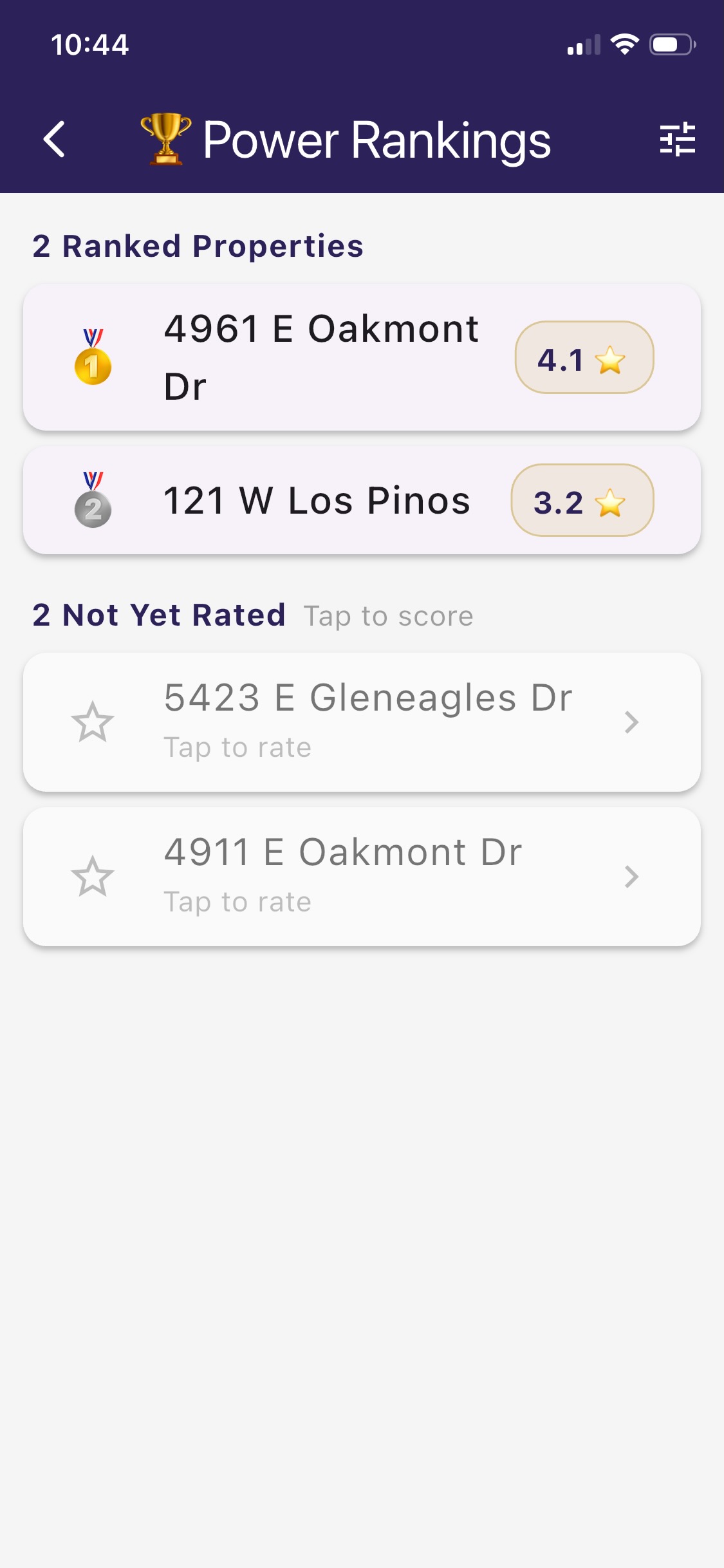
| Score homes on criteria you choose | No | Power Rankings, your criteria, your weights |
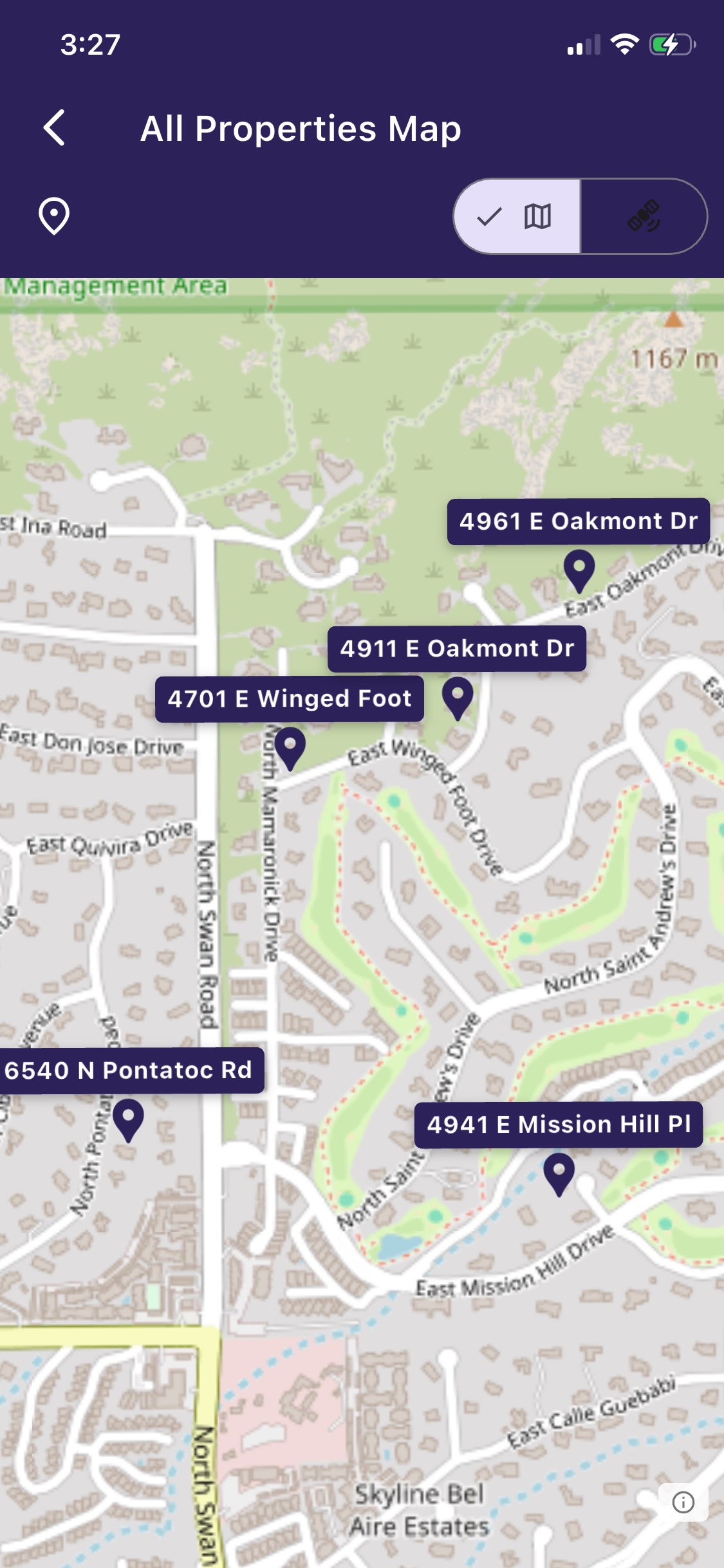
| All your homes on one map | Yes | Yes, plus school districts and flood zones |
| Drive time from your work | No | Yes, per property, plus isochrone zones |
| Attach documents and links | No | Yes, inspection PDFs, disclosures, any web page |
| Mortgage math per property | General calculator | Per property, with amortization |
| Where your information sits | In your Zillow account | On your device, yours, exportable |
Use both. Here is the workflow.
Hunt wherever you like
Use your favorite real estate search site: Zillow, Realtor.com, Redfin, Trulia, your broker's, your local MLS's. Real-Helper is agnostic to the source; it is an organizer that works with whatever search sites you use.
Put the keepers in your own list
Browse to the listing inside Real-Helper and tap Use This Page. You get the address, beds, baths and price without typing any of it. Or share the page over from Safari. Or type the address yourself.
Write it down while you still remember
You can write your notes in the Real-Helper app, or on the back of the paper flyer. The app is less likely to be misplaced. Write down what the neighbor told you, the smell in the basement, what you would have to fix in the first year, how long the drive to work actually took.
Rank them and choose
If you're like us, your home searches have always involved lists of pros and cons with weights and scores for each property - formerly written on a couple of pieces of notebook paper. Real-Helper helps you do that digitally. Decide what matters to you and how much, score each house against it, and read the leaderboard. (Then pick the house you liked the best, regardless of the score! We know how it goes.)
You decide what the map shows, too
Add the places you actually go: your office, your child's school, the gym, your mother's house. Then look at any property and see how long that drive is likely to take.
And that is only the start of what the map will tell you. Travel-time zones radiating out from a property, FEMA flood zones, school district boundaries, all one tap away. For the details, and how all of it compares with the maps in Zillow, Google and Apple, see Maps Built for House Hunting.
Real-Helper is an organizer. It is not affiliated with, endorsed by, or a partner of Zillow or any other real estate listing site, brokerage, or multiple listing service. Zillow is a trademark of Zillow, Inc., used here only to refer to that service. Links are chosen and saved by you, and open the original page when tapped. Descriptions of Zillow's Saved Homes and Homes to Compare features reflect Zillow's own published description of the compare tool together with what we saw using Zillow ourselves in November 2026. Features on any website change; check for yourself.