For Real Estate Agents · iPad & iPhone · Free

Open house
sign‑in,
without the paper.

Set your iPad on the counter. Visitors type their name and phone or email, or scan a QR code and sign in on their own phone. Every visitor lands in your contacts with the time they arrived, and you can see who already has an agent. No handwriting to decode, no clipboard to lose.

⬇ Download Free on the App Store iPhone & iPad  ·  Free  ·  No subscription
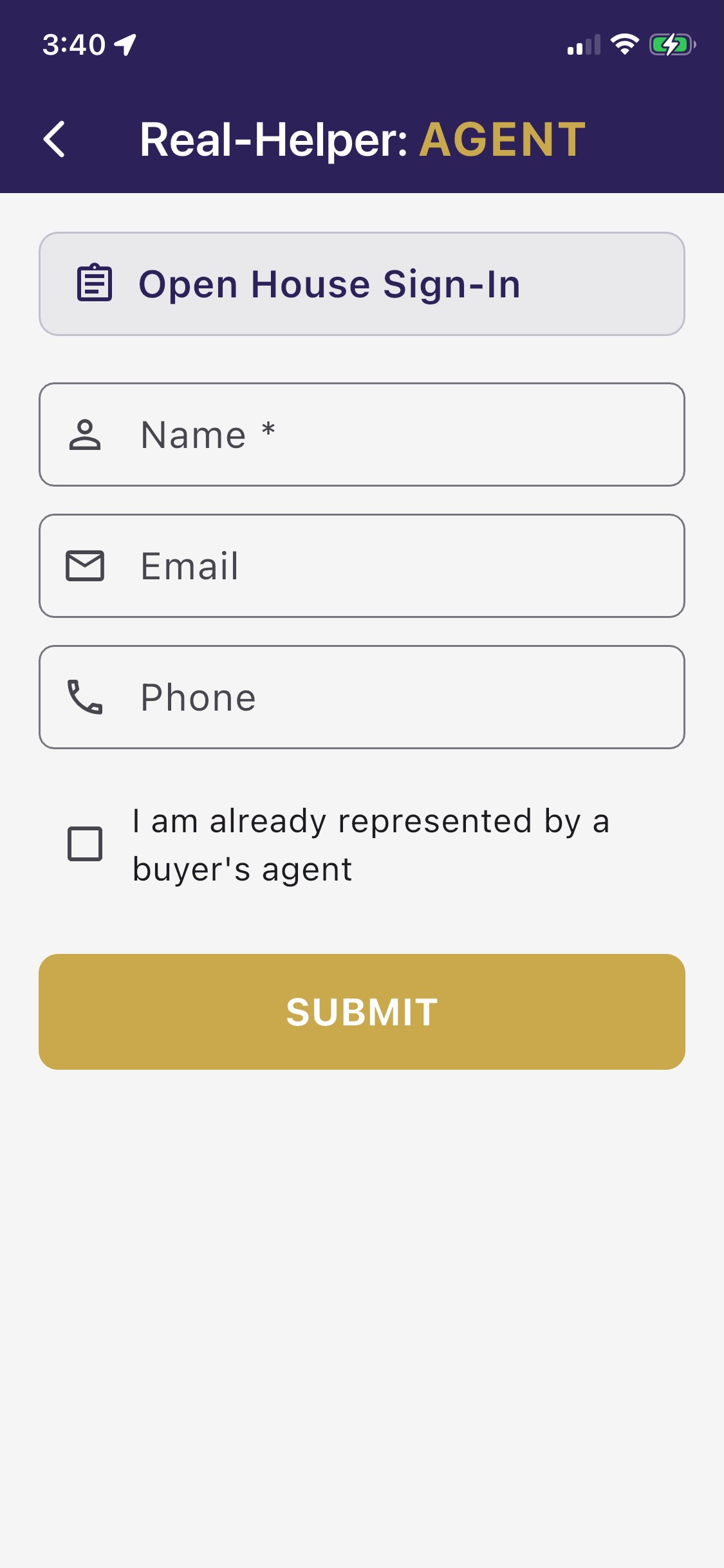
Open house sign-in sheet with a QR code and name, email and phone fields
Two Ways to Sign In

Visitors choose what's easiest for them

Nobody has to download anything to sign in.

📱 On their own phone

They scan the QR code on your screen, sign in with Apple or Google, check their details and tap Check In. Then their phone opens the page you picked, such as your MLS listing or property website. They leave with the listing in their hand.

✍️ On your iPad or iPhone

They type a name and a phone number or email (at least one is required), check a box if they already have a buyer's agent, and tap Submit. The form clears for the next visitor.

Step by Step

Setting up an open house

The quickest way, from a new listing to a sign-in sheet on the counter.

  1. Open Real-Helper: Agent and tap Properties at the bottom.
  2. Tap the Add button, the middle icon at the top:
  3. Tap Browse for a Listing and find the home's listing page: the public MLS listing, or its page on Zillow, Realtor.com, Homes.com or Trulia. Tap Use This Page. The house is added, with the listing page saved as a link.
  4. Back on Properties, tap the house in your list.
  5. Tap the big Open House button.
  6. Tap Start Open House.
  7. Tap Generate QR Code. The listing page you browsed to is already filled in as the page visitors land on after they check in. Save or share the QR image here if you want it on a flyer.
  8. Tap Continue to Sign-In. The sign-in sheet appears, with the QR code at the top. Set it on the counter.
  9. When the open house is over, go back and tap Finish Open House.
After the Open House

Your follow-up list is ready before you lock up

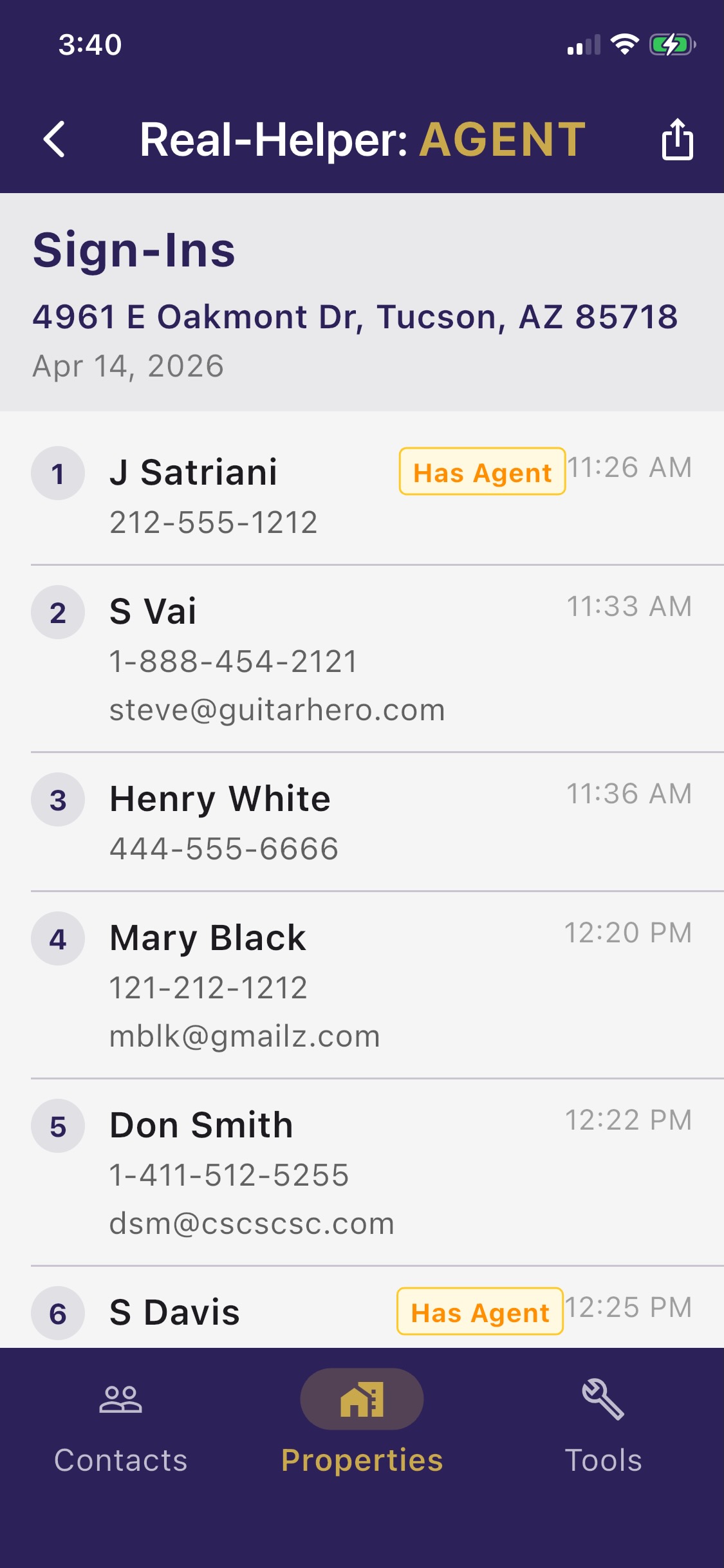
Every visitor is in one list with their sign-in time, and a Has Agent tag on anyone who said they're already represented. Each one is also added to your contacts, with their own page for notes and an activity log.

  • Email everyone at once from your own email account, BCC'd, with the option to include a link to Real-Helper, the free home-search app
  • Export the list as a CSV spreadsheet or a PDF
  • Remove the neighbor who stopped by, or the agent from your office, in one swipe
  • Send the seller a record of who came
List of open house sign-ins with times and a Has Agent tag
Every Open House You've Held

History by property and date

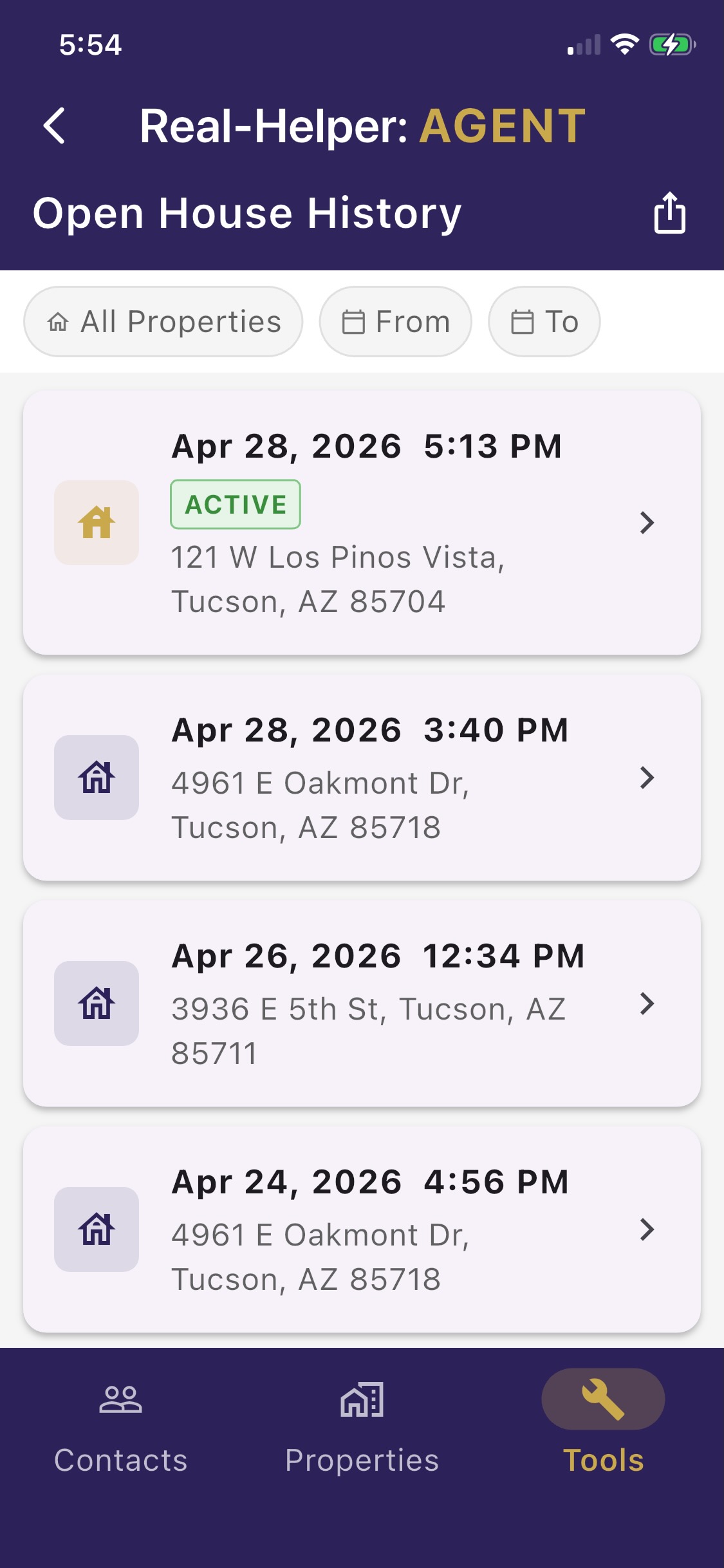
Open houses are kept by property and date. Filter to one property or a date range, open any of them to see who came, or export the whole history as one spreadsheet with a row per guest.

  • No signal at the house? Sign-ins on your device are saved and sync when you're back online
  • Visitors who use Real-Helper can save your listing right from the house: the app sees your open house nearby and offers to add it, with your name as the host
Open house history, filterable by property and date
Paper vs. App

What changes when you drop the clipboard

Paper sign-in sheetReal-Helper: Agent
Handwriting you have to guess atTyped names, phone numbers and emails
Retyping every name into your contactsEvery visitor added to your contacts automatically
No idea who's already working with an agentA checkbox, and a Has Agent tag on the list
Visitors can read everyone else's detailsEach visitor sees only their own
A sheet that gets lost in the carEvery open house kept, searchable, exportable

Questions

Is the open house sign-in app free?

Yes. Open house sign-in is part of Real-Helper: Agent, which is free with no subscription. There is no limit on open houses or sign-ins.

Do visitors have to download an app to sign in?

No. Visitors either type their details on your iPad or iPhone, or scan the QR code on your screen, which opens a web page on their own phone where they sign in with Apple or Google.

What if there is no internet at the house?

Sign-ins on your device keep working without a connection. They are saved on the device and sync when you are back online. The QR code needs the visitor's phone to have a signal.

What information does the sign-in sheet collect?

Name, plus a phone number or an email address (at least one is required), and a box visitors check if they already have a buyer's agent.

Can I export my open house sign-ins?

Yes. Export one open house as a CSV spreadsheet or a PDF, or export your whole open house history as a CSV with one row per guest.

Does it work on an iPad?

Yes. Real-Helper: Agent runs on iPhone and iPad. An iPad on the kitchen counter makes a good sign-in station.

Run your next open house without the clipboard.

Open house sign-in is one part of Real-Helper: Agent, a free app for the clients and contacts you're actively working with.

⬇ Download Free on the App Store